Verso Manager
The office's desk over every estimator's work: assign, follow up, award, keep every bid.
Verso Manager in three minutes.4 screenshotsMore videos on versosuite.com
Already have a licence? instead of starting a new one.
🔒 Secure checkout · Instant delivery
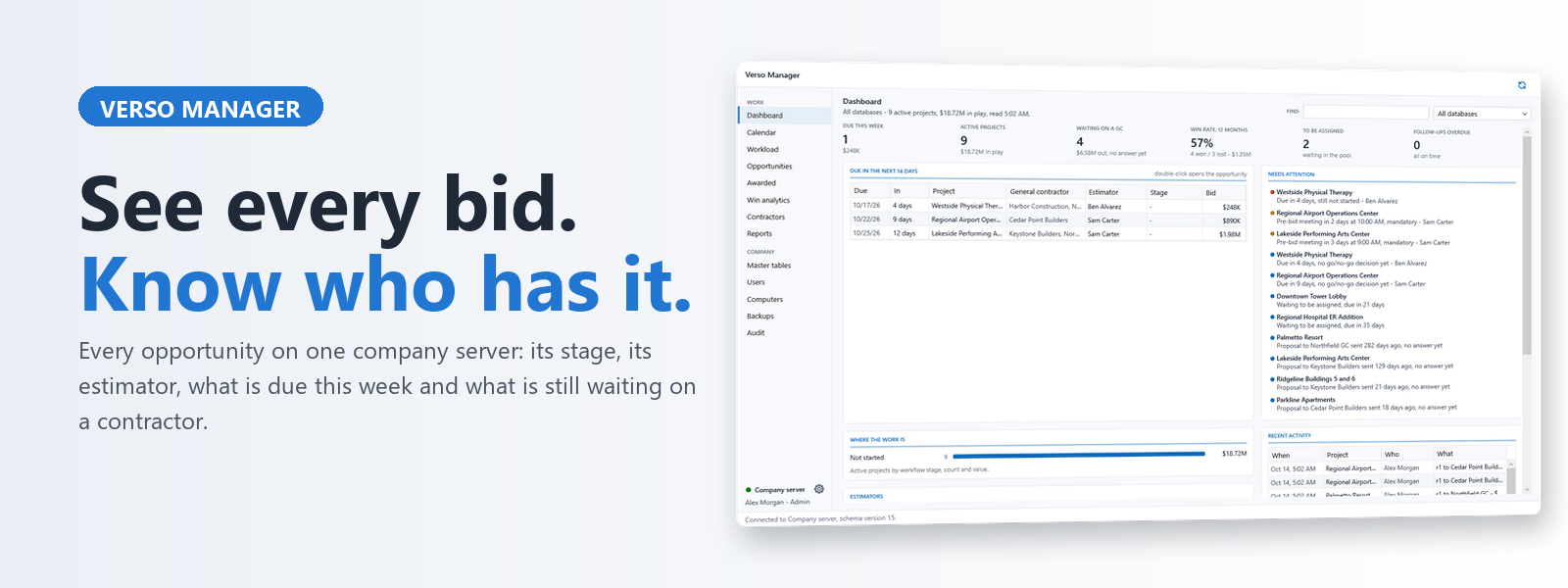
Verso Manager is the company's desk over every estimator's Verso Plans: every opportunity on one server, who has it, where it stands, what went out, what was won.
One job, two desks
An opportunity comes in as a cover sheet with its contractor, bid date and key dates. The office assigns it to an estimator with their workload in view; their Verso Plans shows the hand-over within a minute. Every save pushes the cover and the takeoff file to the company server, so the office always sees the current bid, and every proposal is filed with its revision and outcome.
Award and production
When the job is won, the award freezes the sold version for good, records the contract and the contractor, keeps the job cost line by line, and hands whoever runs the job a full open copy of the sold bid for buyout and savings. The Awarded page shows sold against production, and Verso Build reads the same rows.
The record of the company
- Dashboard: due this week, in play, waiting on a contractor, who has what on the desk.
- Calendar and workload: bid dates, pre-bid meetings, RFI deadlines, every desk over the coming weeks, vacations included.
- Go or no-go scoring on the company's own rules, dated on the record.
- Win analytics by contractor, sector and estimator, with where the price landed.
- Backups: every version of every bid in the company file store; restore any to any estimator.
- Users, roles, computers, support files, an audit trail.
The server is yours
SQL Server in the office or Azure SQL, with a shared folder or an Azure storage container for the files. The Manager creates and upgrades the schema; Verso Plans never needs to. Master tables published once are adopted on every desk.
Requirements
Windows 10 or 11, 64-bit, on the office computer. SQL Server 2016 or later (Express included) or Azure SQL. One Manager licence per company; it works with any number of Verso Plans seats. Free with five or more Verso Plans seats.
Videos, screenshots and help at versosuite.com/manager.
- Push an update: a signed Verso Plans or Verso Manager package into the company file store; every desk takes it at its next report-in, offered as a notice or installed at the next start, a trial on one workstation first
- An update policy for the company: IT pushes updates, or each desk updates itself; the desks obey it at their next report-in
- The schema gate: the Manager will not push until it has brought the server's schema up, and a desk ahead of the schema pushes nothing until it does
- The Manager updates itself from a pushed Manager package, from a title-bar button
- Workstations: every desk with its version, what it did with the push, its tables, its last error and its logs; find and filter; forget an old one; ask for a support file
- Users like Workstations: find and filter, the fleet line, the roles; delete a user
- Dashboard: the figures that need a hand in colour and each a door to its page; what needs attention grouped by reason, a project named once; estimators as loads against the next two weeks; activity folded
- Market sectors under the Manager's gear with a price per square foot, and a pace per sector and per complexity in dollars of estimate a day, the Manager's alone
- The estimate's hours on the cover, from the ROM, the sector and the complexity, with the office's own history where it has one; the plan shown when assigning
- A Schedule view on the Calendar and the Workload page drawn as one timeline: bars over the days of estimating, diamonds on due days
- Go/no-go scored on the Opportunities grid, and on a bid before it is accepted
- Bids handed in: what Verso Bid Radar found lands on the Opportunities page to score, accept into a filled-in cover sheet, or decline; documents beside a bid are filed on the opportunity; a login for that door alone
- Contractors: the public record collected and scored, fair to a big firm; a reliability report written by Claude or ChatGPT; the contractor pane in order
- Connectors: one settings page in sections for the public record keys, the AI writer and the bids handed in
- Reports: a library of built-in reports and the company's own, with groups as bars and rows as a grid, exported to Excel
- Verso Build administered from here: create its database, set the desks' password, manage its users
- A desk key for the storage container, made under Company server: reads and writes for a year, never deletes; the account key stays with IT
- The company server itself refuses, for the shared login, a change to who is who, the roles, the audit trail, a pushed update or the bid intake; the Manager's own pages need the administrator login
- Faster: one cover read by its key instead of every cover in the workspace; only the page on screen loads at connect and at every sync; the pollers and the job cost read off the UI thread; four indexes on the growing tables
- Azure: the company database created on the Basic tier from Settings, and the file store an Azure container
- First public release of Verso Manager, the office's desk over every estimator's Verso Plans
- Dashboard: due this week, in play, waiting on a contractor, who has what on the desk
- Opportunities on one company server with stage, estimator, contractor and padlock
- Assign to an estimator with their workload in view; their Verso Plans shows it within a minute
- Calendar, key dates, go or no-go scoring and workload across every desk
- Every proposal filed with its revision, contractor and outcome; win analytics by contractor, sector and estimator
- Award: the sold version frozen, the contract and job cost kept, a production copy handed to whoever runs the job
- Awarded page shows sold against production, with change orders and Price again
- Backups of every version of every bid in the company file store; restore any to any estimator
- Master tables published once and adopted on every desk
- Users, roles, computers, support files and an audit trail
- SQL Server in the office or Azure SQL, with a shared folder or an Azure storage container for the files
- Company database schema version 15, created and upgraded from the Manager; Verso Plans never changes it
- Excel exports now use an open-source library