Nitxo Desk
The desk organizer for Windows: fences on the desktop, your mail, calendar, files and hours in one quiet side rail. Nothing is ever deleted.
Already have a licence? instead of starting a new one.
Try free, then buy when you're ready
🔒 Secure checkout · Instant delivery
Your desktop, in order
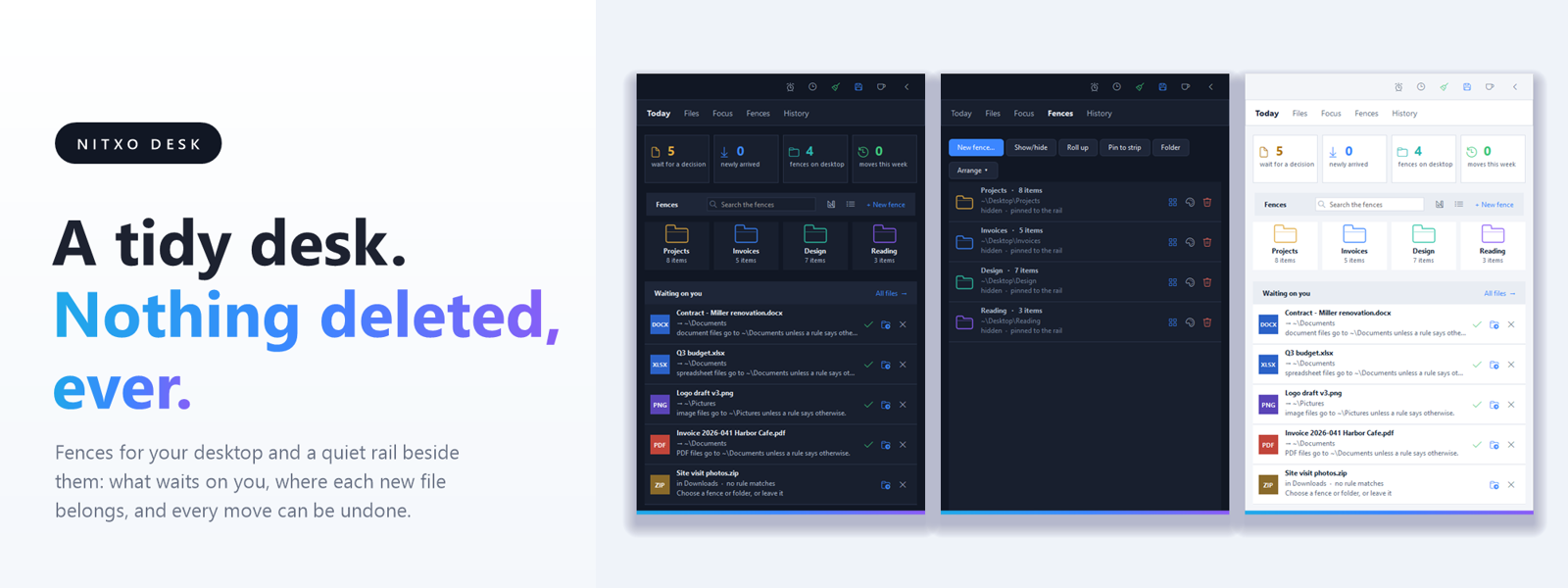
Nitxo Desk puts a slim rail at the edge of your screen and fences on your desktop. Each fence is a real folder drawn where you want it, so files stay where Windows keeps them and every move can be undone.
One rail for the day
Today shows what needs you: files waiting for a decision, unread mail, the next meeting with its prep, and your fences. Mail from any IMAP mailbox, Gmail or Microsoft 365 is read inside the rail. Calendars come in from iCal addresses or CalDAV. Nitxo reads; it never sends, deletes or writes to a calendar on its own.
Files that sort themselves, when you say so
New downloads and desktop files get a suggested home. Approve it, pick another folder, or leave the file where it is. Plain rules run top to bottom, and a rule only moves files by itself once you make it automatic.
Focus, hours and a calmer PC
A Pomodoro clock with break scenes: deep space, a beach at sunset, rain on the window, a coral reef, each with its own sound. A weekly timesheet with projects, tasks, a stopwatch, Excel export and a yearly report. Scheduled backups that only ever copy. A temp-file clean that tells you what it removed.
Private by design
Everything stays on your PC. Passwords and keys are encrypted for your Windows account. Nothing is ever deleted by Nitxo except what you ask for: emptying the Recycle Bin and cleaning temporary files.
Requirements
Windows 10 or 11, 64-bit. Signed installer, no administrator rights needed. One license activates one PC; deactivate to move it. Works offline for 14 days between license checks.
- Settings are kept safe: the file as it was is copied to Backups the first time it changes each day
- A settings file Nitxo cannot read is kept whole, never replaced; Today and Settings > Running say so
- Settings > Running lists the kept copies with Restore, which puts one back and restarts Nitxo
- A value written by a newer version no longer costs an older one the whole settings file
- Fences group the icons on your desktop into named boxes that stay where you put them
- The rail watches Desktop and Downloads and suggests where each new file belongs; nothing moves until you approve it, one at a time or all at once
- Rules move files by name or type on their own, and every move can be undone from History
- Nothing is ever deleted: files only go to the Recycle Bin, and only when you ask
- Today shows the numbers, what waits on you, the next best actions and meeting prep in one place
- Mail brings your inboxes into the rail with drafted replies from an assistant of your choice
- Hours keeps a weekly timesheet with projects and tasks, a stopwatch, Excel export and a yearly report
- Focus runs Pomodoro rounds with break scenes on every screen: Deep space, Beach, Rain and Reef, each with its own sound
- Alerts come with a sound theme or a spoken voice, and each one can be set on its own or switched off
- Backup copies your folders to one or two places on a schedule; PC cleans temporary files with a confirmation
- Four themes: dark, light, follow Windows, or match the colour of your taskbar
- Nitxo checks for a newer version once a day and offers the download on Today